Why not just put everything in the data lake?
It is the obvious question after scenario C. Lake-only ingestion and processing cost about $0.15 per GB together, against $4.30 per GB on the analytics tier. Why not send most data to the lake?
Because Microsoft's own tier comparison says what you give up. These rows are quoted from Manage data tiers and retention in Microsoft Sentinel (updated 2 July 2026). The price row is ours, from the Azure Retail Prices API.
| Analytics tier | Data lake tier |
|---|
| Best for (Microsoft's words) | "Real-time analytics rules, alerting, hunting, workbooks, and all Microsoft Sentinel features." | "Compliance and regulatory logging", "Historical trend analysis and forensics", "Low-touch data that's not needed for real-time alerts." |
| Ingestion cost (Microsoft's words) | "Standard" | "Minimal" |
| Query performance (Microsoft's words) | Optimised | "Slower queries. Good for auditing. Not optimized for real-time analysis." |
| Full set of real-time analytics features | Yes | No: "Limitations on some features, including analytics rules, hunting queries, parsers, watchlists, workbooks, and playbooks." |
| East US list price in, 23 Sep 2026 | $4.30 per GB | $0.15 per GB ($0.05 ingestion plus $0.10 processing) |
The same page is plain about the limit. "Data in the Data Lake tier isn't available for real-time analytics features and threat hunting." Moving an existing table is worse: "When you change a table's tier from Analytics to Data Lake, all real-time analytics and hunting queries stop working."
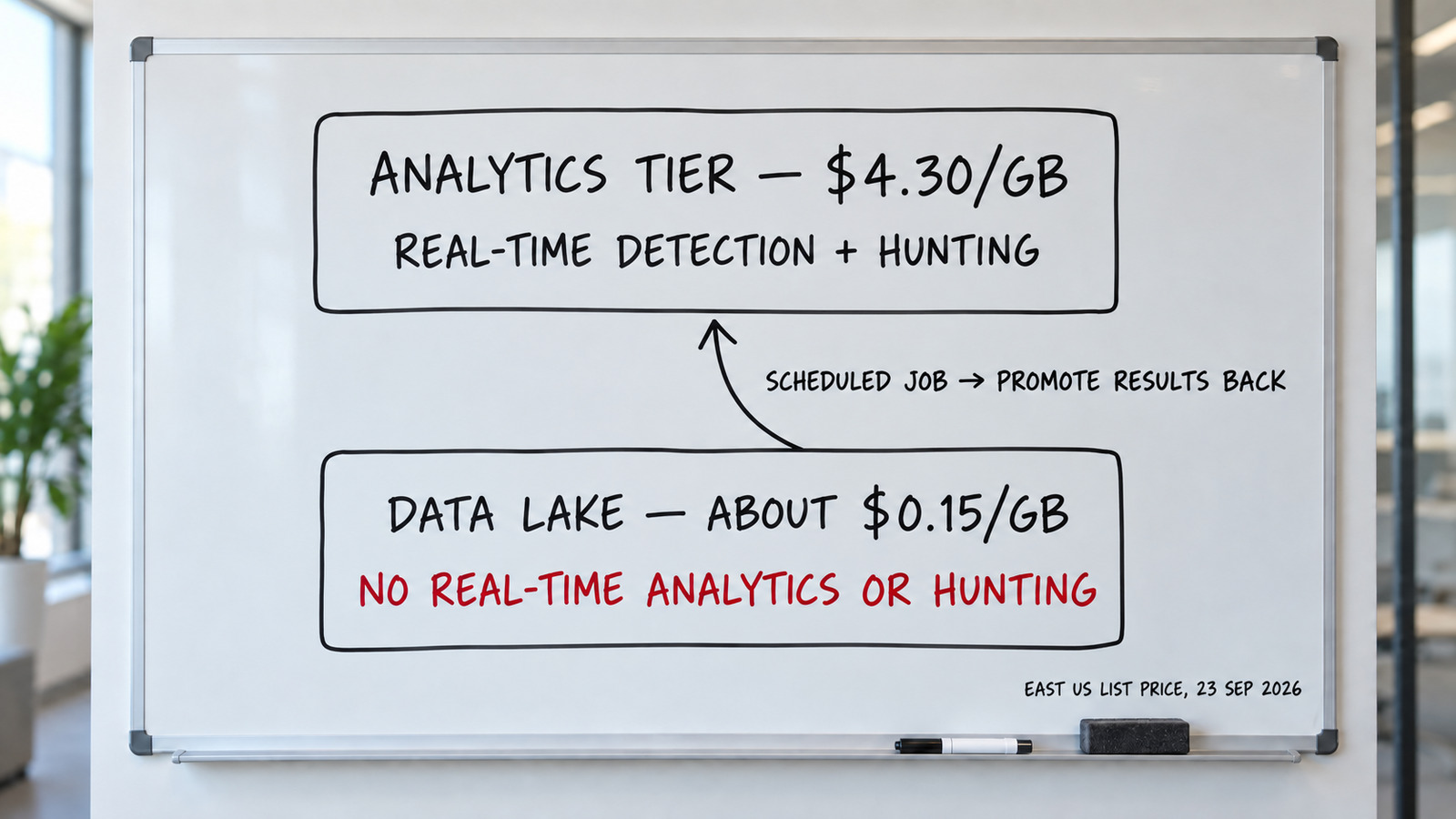
The trade-off in one picture: the lake is cheap, but detection on it needs a scheduled job and a promotion back into the analytics tier. East US list prices, 23 September 2026.
What detection on lake data involves
Lake data is not lost, and you can still look for threats in it, but only through jobs you build and maintain. Microsoft offers two routes. KQL jobs (updated 1 July 2026) are "one-time or scheduled KQL queries" over the lake that write their results to a table. Summary rules (updated 2 July 2026) aggregate data "in the background" into a custom table. Neither raises an alert by itself. In Microsoft's own threat intelligence example, summary rule results land in a table that is "in the analytic tier and are charged accordingly", and you then create "an analytics rule in Microsoft Sentinel that alerts based on results" from that table.
Microsoft's pages set the limits:
- Freshness. New lake data has "a typical latency of up to 15 minutes before the data is available for querying".
- Start delay. A scheduled job's "start time must be at least 30 minutes after job creation or editing".
- Scale. Per tenant, 5 jobs can run at once and 100 can be enabled. A job over the concurrency limit "is rejected and not queued".
- Timeout. Each job query has a 1-hour execution timeout. Microsoft warns: "Partial results might be promoted if the job's query exceeds the one hour limit."
- Cost. Promoted data is billed at analytics-tier rates, which Microsoft notes are higher than the lake's, and each run pays the lake query meter of $0.005 per GB scanned.
So Sentinel asks you to decide, table by table, which data gets real-time detection, and to build jobs for the rest. The tables that go to the lake are the high-volume ones, because that is where the saving is: firewall, DNS, proxy and network flow logs. That is also where an intruder's movement shows. MITRE ATT&CK describes lateral movement as techniques "to enter and control remote systems on a network", and says of command and control that "adversaries commonly attempt to mimic normal, expected traffic to avoid detection". Our judgement: a lake-only network table saves money on exactly the records you would need to see that traffic as it happens.
How SenseOn handles the same choice
SenseOn's detection and hunting are not tied to one storage tier: you choose, per log source, which data goes to Detection & Response. It detects at three speeds: in real time on the endpoint (the Universal Sensor), in near real time across every log source you route to Detection & Response, as it streams through SenseOn's message queue, and with behavioural analytics that run about every five minutes across those same sources. Humans and AI agents can search and hunt across the Observability and Compliance pipelines, for as long as you keep your data, with no restore step. So you get data-lake storage economics (compressed storage) with detection as your routed data arrives, and search, hunting, posture management and dashboards over the data you keep.
The difference comes from who the tiers are designed for. Sentinel's tiering is designed around a person running an interactive query, so older lake data needs a job and a promotion before it can raise an alert. SenseOn is built for agents, not only for analysts at a console. Its long-running AI agents do the long-horizon queries and hunts in the background, so a query over older, colder data can take a little longer without anyone waiting on it. Data rolls from one tier to the next automatically, and you choose, per source, which pipeline it goes to: Detection & Response for detection, or Observability and Compliance for search and hunting.
| Sentinel data lake tier | SenseOn |
|---|
| Real-time detection | Not available on lake-only tables | Real time on the endpoint; near real time across every log source you route to Detection & Response, on the message queue |
| Detection on stored data | KQL jobs or summary rules you build, results promoted to an analytics-tier table, then an analytics rule | Built-in behavioural analytics about every five minutes across every log source you route to Detection & Response |
| Hunting on older data | Lake queries and KQL jobs at $0.005 per GB scanned; Sentinel hunting queries stop working on lake-only tables | Humans and AI agents search and hunt across the Observability and Compliance pipelines, for as long as you keep your data, with no restore step |
| Storage cost | $0.15 per GB in, then $0.026 per GB per month at 6:1 compression | Data volume is one meter, not the whole bill; storage priced on compressed data; 30 days of hot storage included in the pipeline cost (Sentinel's analytics tier includes 90 days) |
Sentinel rows: the Microsoft Learn pages cited above and the Azure Retail Prices API, East US, 23 September 2026. SenseOn rows: SenseOn product pages.
How to cut the bill
Microsoft's own cost reduction guide and billing page list these levers. In rough order of impact:
- Match the commitment tier to your volume. Check actual daily ingestion, then pick the tier whose break-even point you clear on most days. Review it at each 31-day window.
- Buy a pre-purchase plan. Microsoft sells Sentinel commit units for a one-year term; eligible analytics costs draw them down automatically.
- Keep non-security data out. Microsoft advises a separate workspace for operational data "to ensure it doesn't incur Microsoft Sentinel costs".
- Send secondary data to the lake. Verbose logs you keep only for audit and forensics rarely need analytics-tier pricing. Before you move firewall, DNS or proxy logs, read the section above: lake-only data loses real-time analytics and hunting.
- Use total retention for old data. Let data age out of analytics retention into the lake rather than paying analytics retention.
- Filter at the source. Data collection rules on the Azure Monitor Agent let you ingest only the Windows security events you select. Microsoft also warns that CEF logs with many extra fields land in the AdditionalExtensions table and can raise volume.
- Enable only the paid data types you use. Connectors that mix free and paid types let you pick. Microsoft's example is keeping free Defender for Cloud Apps alerts while leaving paid shadow IT reports off.
- Pool workspaces in a dedicated cluster. If workspaces in one region ingest 100 GB a day or more together, a Log Analytics dedicated cluster can share one commitment tier.
- Claim the free allowances. Check the E5 benefit and always-free sources before you size a tier.
NIST's Guide to Computer Security Log Management (SP 800-92) makes the same point from the other side: decide what each log source is for and how long you must keep it before you collect it. A per-GB bill rewards that discipline. For more options that apply to any SIEM, see our SIEM price reduction tactics, and for the costs that sit outside the licence line, read the hidden costs of SIEM.
Alternatives to per-GB pricing
Every lever above manages volume. Some teams would rather price security on outcomes, because a bill driven only by volume gives you a reason to collect less. Our SIEM alternatives comparison sets out how each platform charges for data.
Where SenseOn fits. If you are sizing a Sentinel commitment tier, or deciding which tables to push to the lake, the question SenseOn answers is different: how do you keep detection on the log sources you route to Detection & Response, and let people and AI agents search older data for as long as you keep it, with no restore step? SenseOn is priced as an annual pool of Flex Intelligence Credits. You pay for outcomes: detection and response across your data, analytics included, and the investigations its AI completes. Data volume is one meter, not the whole bill. Three levers bring the cost down: edge processing removes unnecessary data before the pipeline, Weave (SenseOn's security engineering agent) routes data down three pipelines with storage separated from compute, and ClickHouse compression means storage is priced on the compressed volume. Together they cut costs by about 40% against a traditional SIEM, and the price also covers the AI agents that investigate and resolve cases. One lightweight Universal Sensor captures endpoint, network and identity telemetry on Windows, macOS and Linux (Linux network telemetry needs kernel 5.2 or later with eBPF; older kernels give process telemetry, and a network probe covers segments where no agent can run). Out-of-the-box integrations bring in Microsoft 365, AWS and identity provider signals. SenseOn deploys alongside your existing SIEM and EDR, so you can run it next to Sentinel for a 14 to 28 day proof window and compare on your own data before you change anything. Our SenseOn vs Microsoft Sentinel comparison covers when each fits, and the pricing page shows the credit plans.
Sources
- Microsoft Learn, Plan costs and understand pricing and billing for Microsoft Sentinel, updated 1 April 2026, accessed 23 September 2026
- Microsoft Learn, Reduce costs for Microsoft Sentinel, updated 14 June 2025, accessed 23 September 2026
- Microsoft Learn, Manage data tiers and retention in Microsoft Sentinel, updated 2 July 2026, accessed 23 September 2026
- Microsoft Learn, Create jobs in the Microsoft Sentinel data lake, updated 1 July 2026, accessed 23 September 2026
- Microsoft Learn, Aggregate Microsoft Sentinel data with summary rules, updated 2 July 2026, accessed 23 September 2026
- MITRE, ATT&CK Lateral Movement, TA0008 and Command and Control, TA0011, accessed 23 September 2026
- Microsoft Learn, Microsoft Sentinel data lake overview, updated 11 August 2025, accessed 23 September 2026
- Microsoft, Microsoft Sentinel pricing, accessed 23 September 2026
- Microsoft, Microsoft 365 E5 benefit offer for Microsoft Sentinel, accessed 23 September 2026
- Microsoft Learn, Azure Retail Prices REST API overview, updated 6 August 2024, accessed 23 September 2026
- Microsoft, Azure Retail Prices API, Sentinel meters, East US, read 23 September 2026 (Sentinel, Log Analytics and Logic Apps meters; GBP reference prices from the same API with currencyCode GBP, region uksouth)
- Microsoft, Azure Logic Apps pricing, accessed 23 September 2026
- NIST, SP 800-92: Guide to Computer Security Log Management, September 2006, accessed 23 September 2026
How SenseOn writes, checks and corrects its content: editorial standards.
Frequently asked questions
How much does Microsoft Sentinel cost per GB?
At Microsoft's US list price for East US, read on 23 September 2026, pay-as-you-go analytics ingestion is $4.30 per GB. Commitment tiers lower the effective rate, from $2.96 per GB at 100 GB a day to $2.052 per GB at 50,000 GB a day. Your own price depends on region, currency and agreement, so confirm it in Microsoft's cost estimator.
Is there a free tier of Microsoft Sentinel?
There is no permanent free tier, but three things cost nothing. A new workspace gets up to 10 GB a day free for 31 days. Some data sources are always free, including Azure Activity logs, Office 365 audit logs and alerts from Microsoft Defender products. Microsoft 365 E5, A5, F5 and G5 customers get up to 5 MB per user per day of eligible Microsoft 365 data at no charge.
What is the Microsoft Sentinel data lake tier and how is it billed?
The data lake tier is a lower-cost store for secondary security data and long retention, up to 12 years. It has separate meters for ingestion, processing, storage and query. At the East US list price on 23 September 2026 these were $0.05 per GB ingested, $0.10 per GB processed, $0.026 per GB per month stored and $0.005 per GB scanned. Storage is billed on data compressed at a flat 6:1 ratio.
Why not send all Microsoft Sentinel data to the data lake tier?
Because lake-only data loses real-time detection and hunting. Microsoft's tier comparison says data in the data lake tier "isn't available for real-time analytics features and threat hunting", and that when you move a table from analytics to the lake, "all real-time analytics and hunting queries stop working". You can still detect on lake data, but only through scheduled KQL jobs or summary rules you build. New lake data typically takes up to 15 minutes to become queryable, a job must start at least 30 minutes after you create it, a tenant can run 5 jobs at once with 100 enabled, and each job query times out after an hour. To raise an alert, results are promoted to an analytics-tier table, billed at analytics rates, where an analytics rule runs; each run also pays $0.005 per GB scanned. The sources teams move to the lake, such as firewall, DNS and proxy logs, are often where lateral movement and command-and-control show. SenseOn takes a different approach: behavioural analytics run about every five minutes on the sources you route to Detection & Response, and humans and its AI agents can search and hunt the Observability and Compliance pipelines for as long as you keep the data, with no restore step.
When should I move from pay-as-you-go to a commitment tier?
When your steady daily volume is above the break-even point. At East US list prices, the 100 GB a day tier costs less than pay-as-you-go once you ingest about 69 GB a day. You can raise a tier at any time, but you can only lower it or return to pay-as-you-go after the 31-day commitment period.
Do Sentinel playbooks cost extra?
Yes. Playbooks run on Azure Logic Apps, which is billed separately from Sentinel. On the Consumption plan each action is metered: the Azure Retail Prices API listed standard connector actions at $0.000125 and enterprise connector actions at $0.001 in East US on 23 September 2026. For most teams this is small next to ingestion, but a playbook that fires on every alert can add up.


